- This topic is empty.
-
AuthorPosts
-
 psycherhexicMember
spoken like a champ ;D
i was wrong..
 spychtMember
*raises hands in the air and bobs up and down*
Winner winner chicken dinner.
Nice meeting you at SEOA monn.Tips and tricks.. tips and tricks.. don't have any but I'll let you guys in on a secret.. Gold rays are plated and actually made of cheese.
 AscensionKeymaster
Some things I'm doing with a new track:
snares with a low velocity (~60 or less) on beats other than the 2 and 4 are fun 🙂
using reverse hihats as a percussion pattern and occasionally using a stretched version (2x as long or so) gives some neat variation
 zensphereMember
^I will sometimes put a 3/16 delay on the snare to make the beat sound less square and give it a little dub feel…
AscensionKeymasterZ3Ta+ download for only €19.99:
http://www.store.cakewalk.com/b2ceuro/ProductInfo.aspx?productid=35-CWZ31.40-20E
 psilopsybenParticipant
I have a good tutorial for the Z3ta+ that's been stickyed on triplag. I found it on kvr. Guess I could post it here too. Here ya go….
The synth will sound like this:
—->http://www.cybernetika.de/synths/the dark fm saw_2.mp3If you add some panning and gating to it, it can produce awesome hard staccato rythms.
—-> http://www.cybernetika.de/synths/the dark fm saw with panned gate.mp3Ok,
to follow this tutorial, you will most likely need z3ta. Open a new patch, and try to follow the instructions.
If you want to have this sound ready for use, you can download the z3ta patch here:
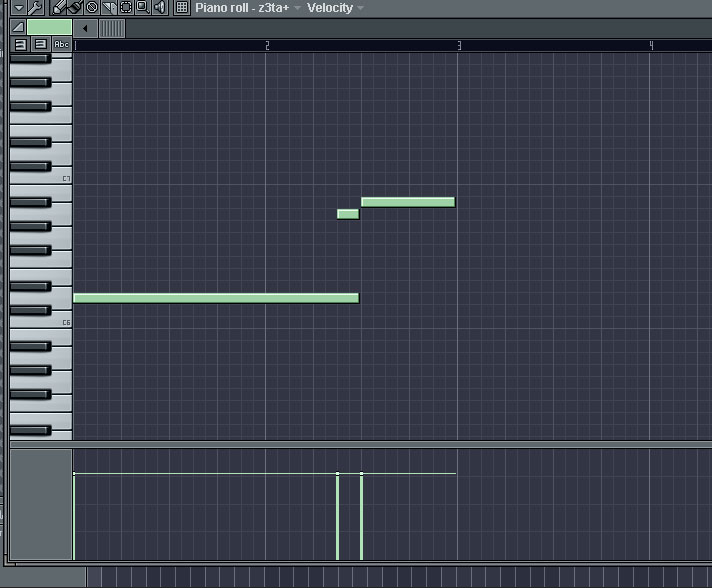
—-> http://www.cybernetika.de/synths/dark fm saw.fxpso I start with a very simple melodic pattern, nothing special here.
In the end our z3ta that outputs a beautiful sound will look like this:
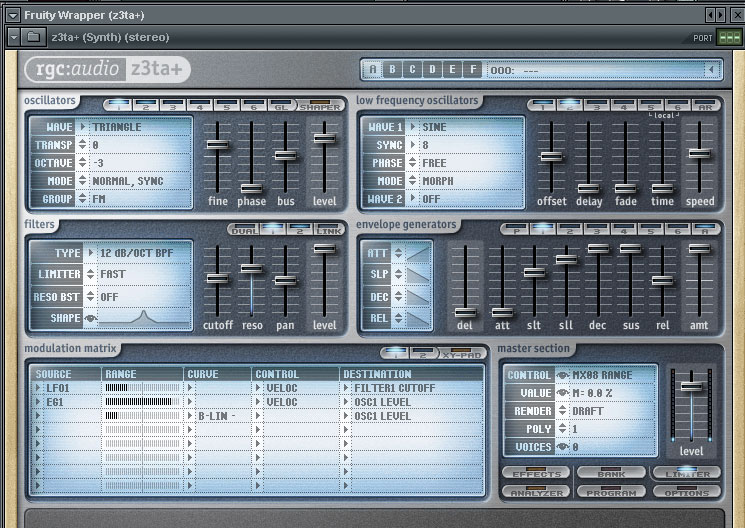
– In z3ta, I will use 2 Oscillators. Oscillator 1 is the modulator, Oscillator 2 is the carrier. Its pretty easy to do this in z3ta.
– first, set the polyphony to 1.
– set Osc1 Wave to “Triangle”. Low Triangle waves are awesome modulators for this kind of sound.
– set Osc2 Wave to “Vintage Saw 1”. This is our carrier, you can also choose other waveforms, but in my opinion saw waves are the best.
– set Osc1 Group to “FM”. This means our waveform is now a frequency modulator.– set Osc1 Octave to -3 and Osc2 Octave to -1. You can choose other octaves of course, but the modulator should always be 2 octaves lower than the carrier for best results.
– filter 1 should be set to a 12 db bandpass filter with 2/3 resonance.
– filter 2 is a 12 db lowpass filter with resonance and cutoff set at around 1/2.– next, increase the “Bus” of oscillator 2. This means, more of its signal will go through filter 1 (since filters are cool we want to do this)
– play around with the level of oscillator 1. The higher you take it, the “noisier” our sound will be, so if you dont want to end up with noise, dont set it too high.– set the “render quality”, if you havent done this already, to draft. This will result in a much rawer output. We want a raw, dirty sound, so this would probably be useful.
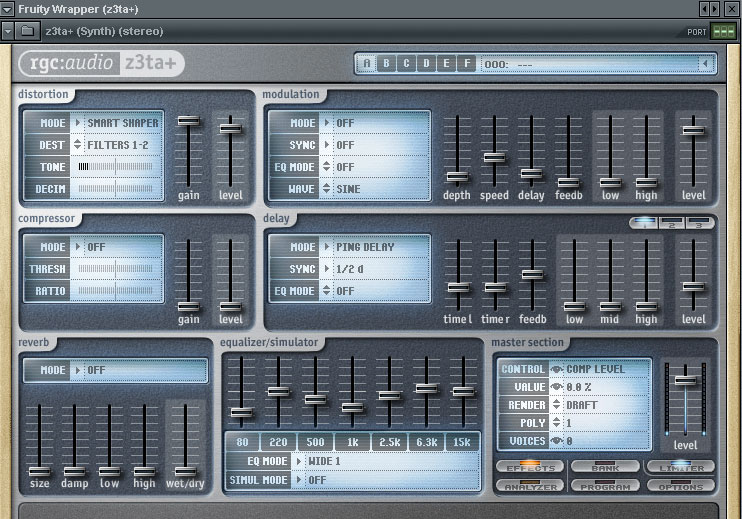
– next we go to the effects page in z3ta and add a slight bit of delay, and distortion set to maximum amount, type smart shaper, destination filters 1-2.
-also do some EQ to cut a bit of the nasty mids.
here is what the fx page looks like:
-now back to the front page.
– we change the envelope to minimum attack, maximum sustain, maximum decay, no release.
– we add an LFO with destination “filter 1 cutoff”, then we add some sick modulation to our filter. Yay. Z3ta has some nice step envelopes that can do some cool LFO things.
These are my LFO settings: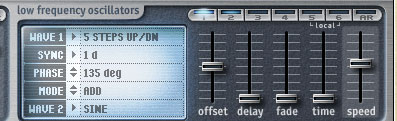
– now play around with speed and range of the LFO modulation until you got something that sounds nice.
– if you wan, you can add some extra tweaking of filter 1 cutoff, and add it as automation envelope.Well, I almost think thats all of it.
Remember that the modulation amount, that is the level of oscillator 1, is the most important tool to shape the sound the way you like it, either “bassy” or ..well.. “nasty saw like”
I also added some CamelPhat distortion to it, a bit of overdrive really works on this kind of sound.
If you want to go even more crazy and create some rythmic patterns out of it, try CamelSpace.
Again, Here is what I did to our first sound with crazy panned gating:
—-> http://www.cybernetika.de/synths/the dark fm saw with panned gate.mp3psilopsybenParticipantI know that I included the patch along wtih the tutorial, but I would highly suggest following the tutorial and creating it yourself. That way you will know how this sound is created and you can figure out how to tweak it to your liking. Have fun!!!!
 aktifMember
I know that I included the patch along wtih the tutorial, but I would highly suggest following the tutorial and creating it yourself. That way you will know how this sound is created and you can figure out how to tweak it to your liking. Have fun!!!!
FACT
DONT SAY DO
psilopsybenParticipantyeah I was lazy when I first saw this and just plugged the patch in. I had no idea how to tweak it right until I followed along. Very fun sound to mess with.
 destroysoundMember
Nice!
I used to use Z3ta+ quite a bit, but haven't had a chance to pick it up in a while… looks like I need to hop on it again 🙂
psycherhexicMemberthis might seem like an absurd tip, but I find it useful. everyone knows i'm an ableton fanboy and I'm like a crack fiend looking for new tips and techniques involving live. so…
simply go to the ableton forum and search for post author “Robert Henke” (hopefully you know who that is) and just read his posts lol.
seriously I spent probably an hour last night just skimming through and clicking on anything remotely production related and now i'm kicking myself for not just copy and pasting because there was so many little spurts of SERIOUS DEEP information in such a short time its almost rediculous.. and I only went back to fall of 08.. the posts start in 04.
stuff from VERY exact/simple 5 line definitions of a compressor.. to highly complex info about sample rate and how live works in those regards.. to links to weird project files where he has quickly setup interesting work arounds.. to deeply descriptive info about how the guts of fx plugs actually work on the signal.
my whole adventure started from someone else linking to an old post with a poll about lives reverb.. i scrolled down and Henke in like 1 paragraph had totally made me understand the different approaches to reverb i've never experimented with.
dont sleep. 😛
AscensionKeymasterSome postings about reverbs (there's other good stuff on this site too):
http://kimlajoie.wordpress.com/tag/reverb
Main site:
AscensionKeymasterJust found fun sounds you can get from playing with the pitch decay on ableton's beat repeat :).
psilopsybenParticipantbtw, I find a lot of ableton tips and tricks on the forum: http://abletonlivedj.com
AscensionKeymasterHuge ableton download pack-says its 4.4 gigs worth, some on the ableton forum say it's 2.9 unzipped (need to be on version 8.13 to run this apparently):
http://www.ableton.com/de/nl600-partner-instrument-compilation
-
AuthorPosts
